PurpleC2: Building a Custom C2 and Understanding How to Detect It
A Purple Team laboratory study of C2 detection using network and endpoint telemetry from Sysmon, Wazuh, and Zeek.
Introduction
Command and Control infrastructures, more commonly referred to as C2, play an important role in the study of cyberattacks. After compromising a system, an attacker generally seeks to maintain a communication channel with it in order to send instructions, retrieve command outputs, or maintain control over the host. This phase corresponds to Command and Control.
The goal of this project is to progressively build a simple C2 in Python, then evolve its communication profile while studying the traces it generates both on the network and on the compromised host. The approach is intentionally Purple Team-oriented: each evolution of the C2 is accompanied by an analysis of its visibility from a defender's perspective using Sysmon, Wazuh, and Zeek.
The objective is therefore not only to make the C2 functional, but also to understand how different changes affect its detection.
The project repository is available on GitHub: Antoine-Romet/purpleC2.
How a C2 Works
In the MITRE ATT&CK framework, Command and Control corresponds to tactic TA0011. It covers techniques used by adversaries to communicate with compromised systems under their control.
A simple C2 architecture generally relies on two main components:
- a C2 server, controlled by the operator;
- one or more agents, running on remote systems.
Once started, the agent must be able to locate its server and communicate with it. This communication may rely on different protocols such as HTTP, HTTPS, or DNS. In many architectures, communication is initiated by the agent toward the server. This makes it possible to rely on outbound traffic, which more closely resembles normal network activity. The agent then periodically contacts the server to indicate that it is still active and to check whether a new task is available. This mechanism is known as beaconing.
The overall workflow can be summarized as follows:
- the agent registers with the server;
- it periodically contacts the C2;
- the server may return a task;
- the agent executes the task;
- the result is sent back to the server.
This is the mechanism that PurpleC2 progressively implements throughout the project.
Test Environment
All experiments presented in this article are performed in an isolated laboratory environment.
The infrastructure is hosted on a Proxmox server and relies on several virtual machines:
- Kali Linux: PurpleC2 server and operator machine;
- DC1 Windows Server: system used to run the agent;
- Wazuh: collection and analysis of Windows telemetry;
- pfSense: routing between the different laboratory networks;
- Zeek: network monitoring sensor.
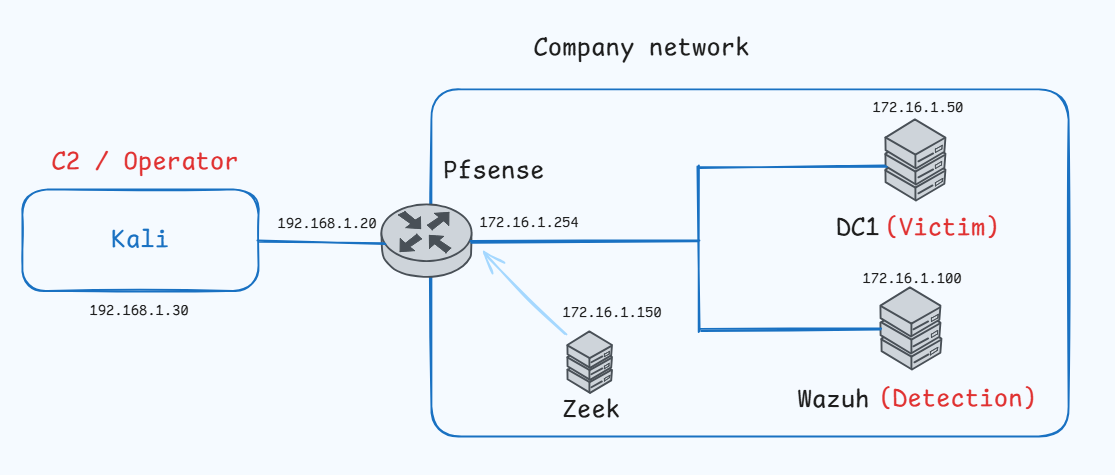
This architecture makes it possible to observe the agent's behavior from several perspectives at the same time:
- operator side;
- Windows endpoint;
- endpoint monitoring;
- network monitoring.
PurpleC2 V0 — Noisy Baseline
The first version of PurpleC2 intentionally represents a highly visible baseline. The objective is to obtain a functional C2 with as few additional mechanisms as possible before progressively studying the impact of later changes.
V0 mainly provides the following capabilities:
- registering an agent with the server;
- maintaining a periodic beacon;
- creating a task from the operator interface;
- executing that task on the remote system;
- retrieving its output.
How V0 Works
When started, the agent contacts the server using:
POST /register
It sends information such as its hostname and operating system platform. The server then assigns it a unique identifier. Once registered, the agent enters a beaconing loop.
Every 10 seconds, it sends:
POST /beacon
The beacon has two purposes:
- informing the server that the agent is still active;
- retrieving a pending task if one exists.
The architecture therefore relies on polling: the operator creates a task on the server, and the agent retrieves it during its next beacon. Once the task has been executed, its output is returned through:
POST /result
This first version also uses an easily identifiable User-Agent:
PurpleC2/0.1
Detecting V0
The first detection campaign focuses on observing the traces produced by this intentionally simple implementation.
The scenario is the following:
- start the agent on DC1;
- register with PurpleC2;
- wait for several beacons;
- execute the
whoamicommand from the operator interface; - retrieve the result.
Validating the C2 Workflow
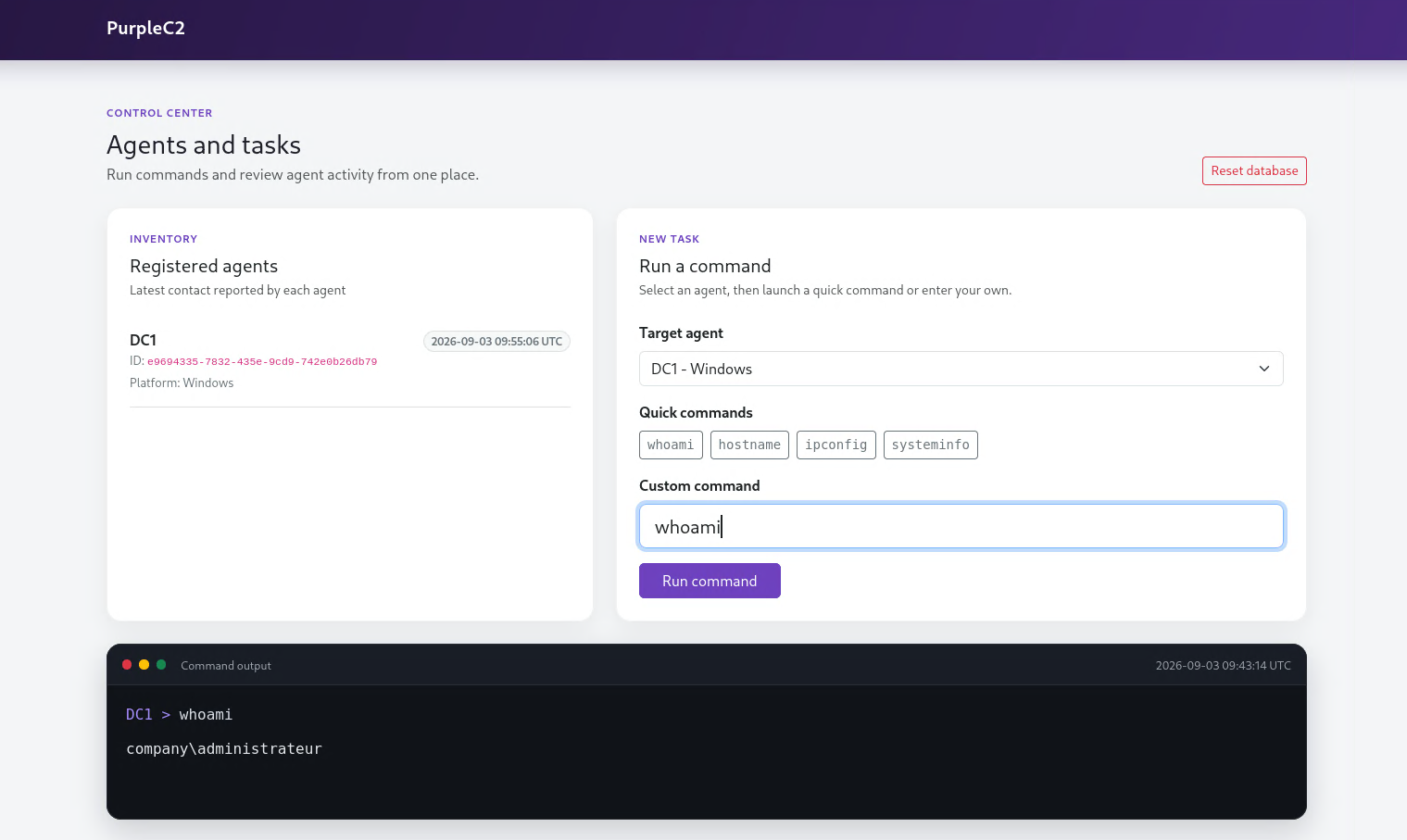
From the operator interface, DC1 appears as registered and active. The command: whoami is sent to the agent, executed on the Windows system, and then returned to the server. In this example, the result is: company\administrateur.
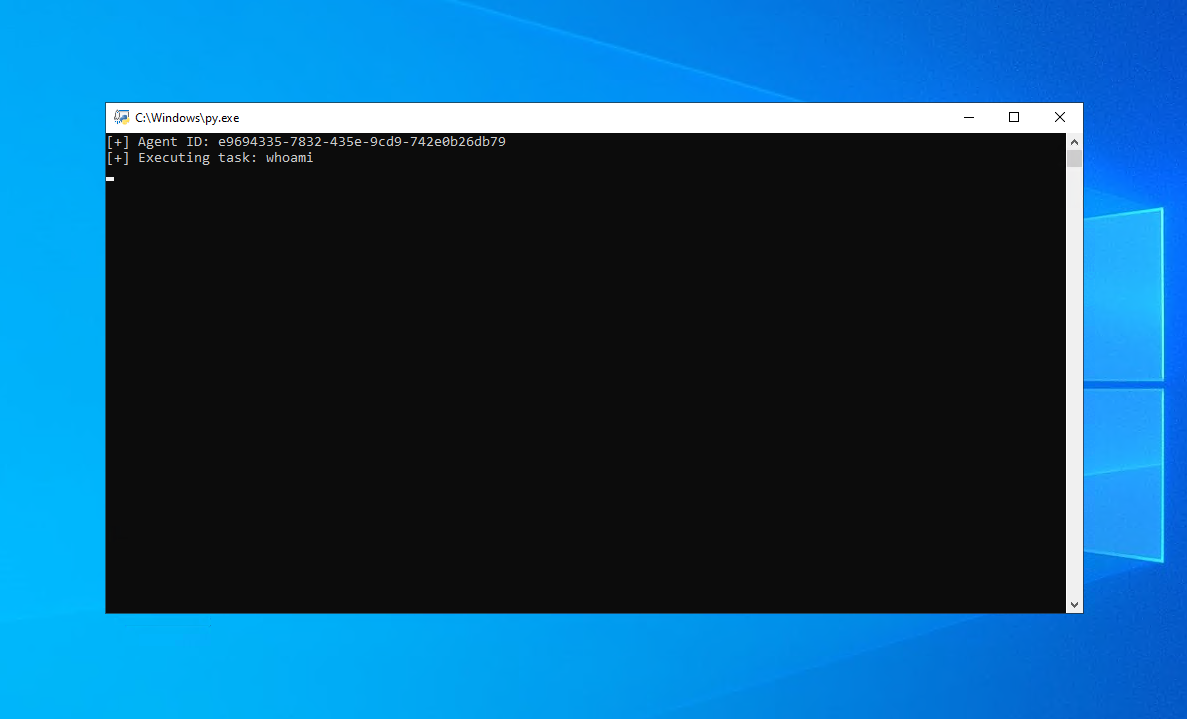
On the compromised host, the agent is executed directly with Python. The console displays information such as the agent identifier and received tasks. In this version, the visible Python console is already an obvious artifact for the user.
Endpoint Detection with Sysmon and Wazuh
Sysmon provides detailed visibility into the processes and network connections generated by the agent.
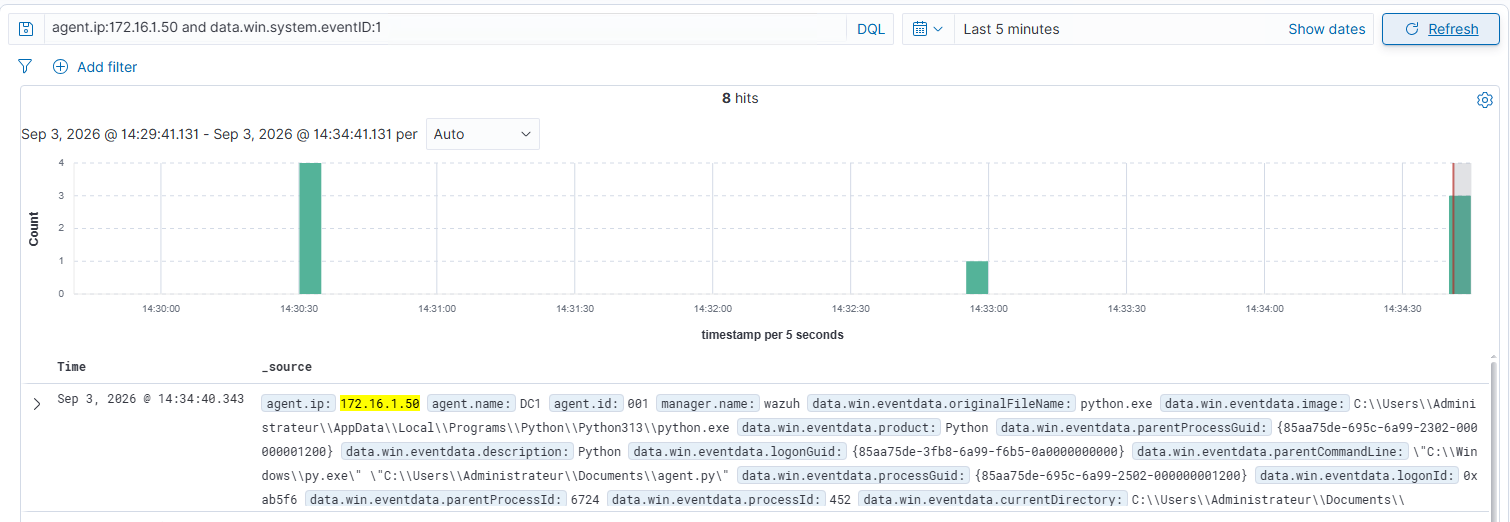
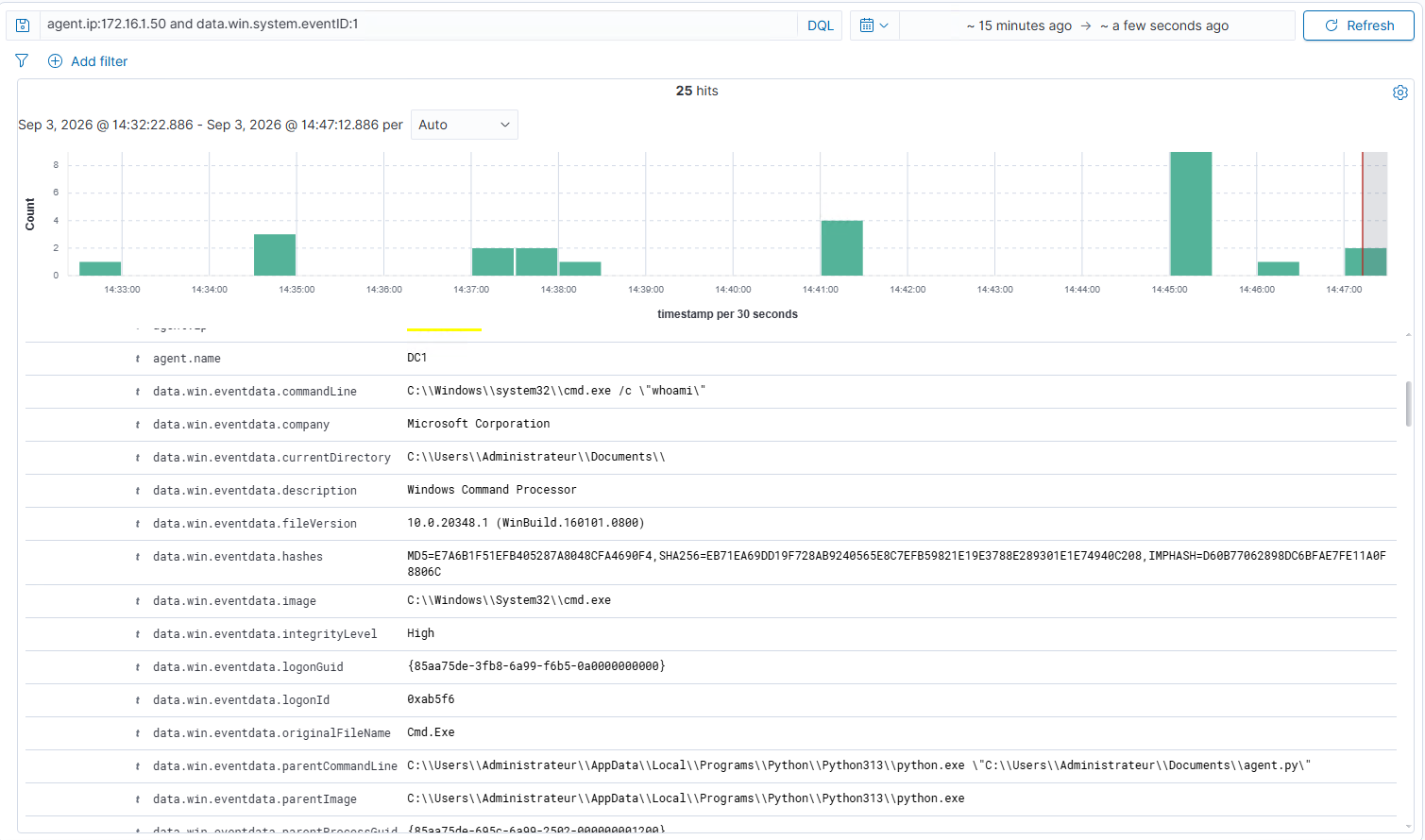
A first Sysmon Event ID 1 — Process Create event shows the agent starting.
Wazuh identifies:
- the
python.exeprocess; - its execution path;
- the command line;
- the executed
agent.pyscript.
When whoami is executed, a second process creation event is generated.
The observed command line is similar to: cmd.exe /c "whoami" The parent/child relationship makes it possible to associate cmd.exe with the Python process running the agent.
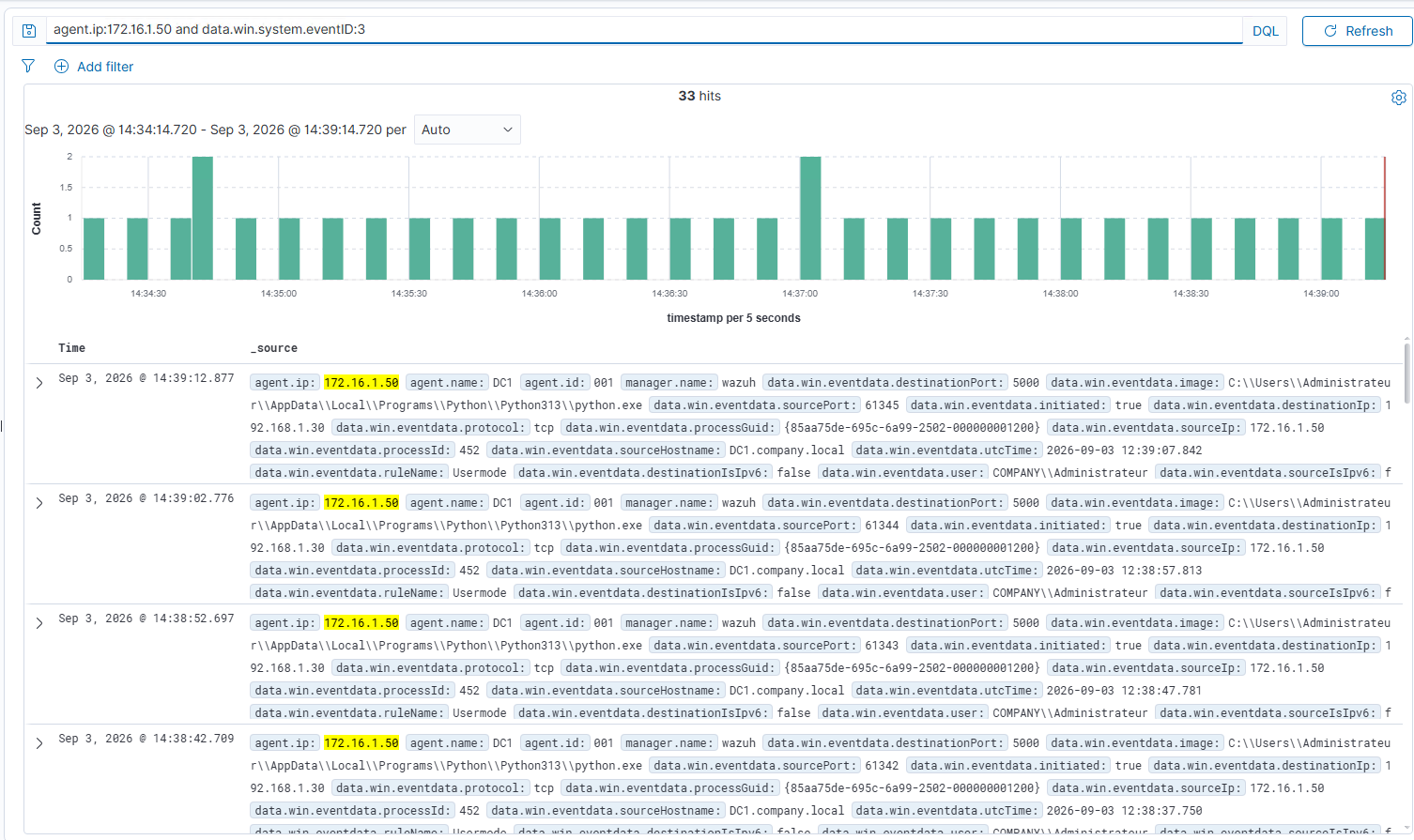
Sysmon Event ID 3 — Network Connection events then reveal the network activity generated by the agent.
DC1, using the address:172.16.1.50 regularly contacts the PurpleC2 server: 192.168.1.30:5000
Connections appear approximately every ten seconds.
This periodicity directly matches the beacon interval configured in the agent.
Network Detection with Zeek
The Zeek sensor provides a second perspective on C2 communications.
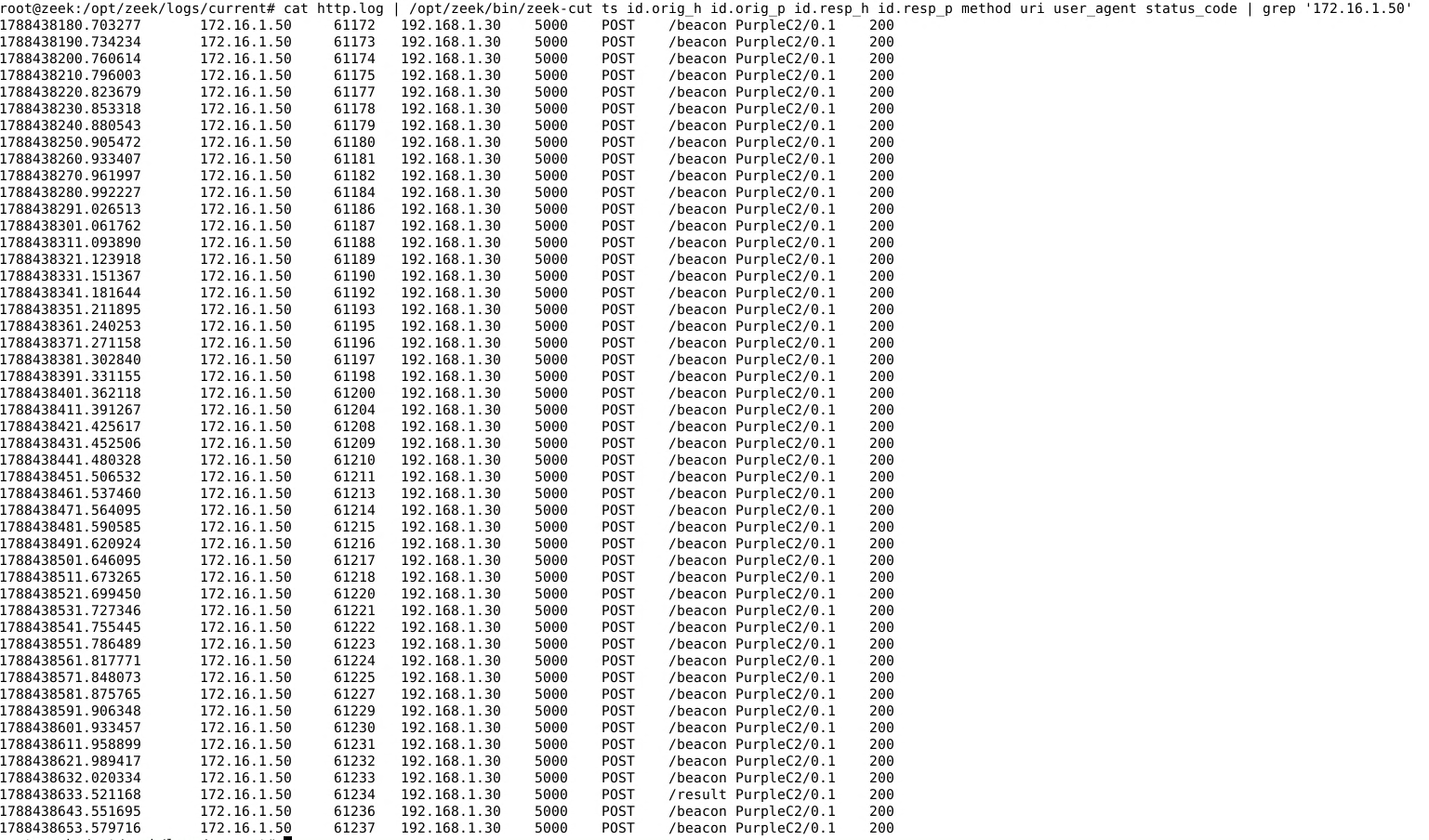
The HTTP logs show:
POST /register
POST /beacon
POST /beacon
POST /beacon
...
POST /result
Communications are sent to:
192.168.1.30:5000
and use the following User-Agent:
PurpleC2/0.1
The repetition of /beacon requests every ten seconds is particularly noticeable.
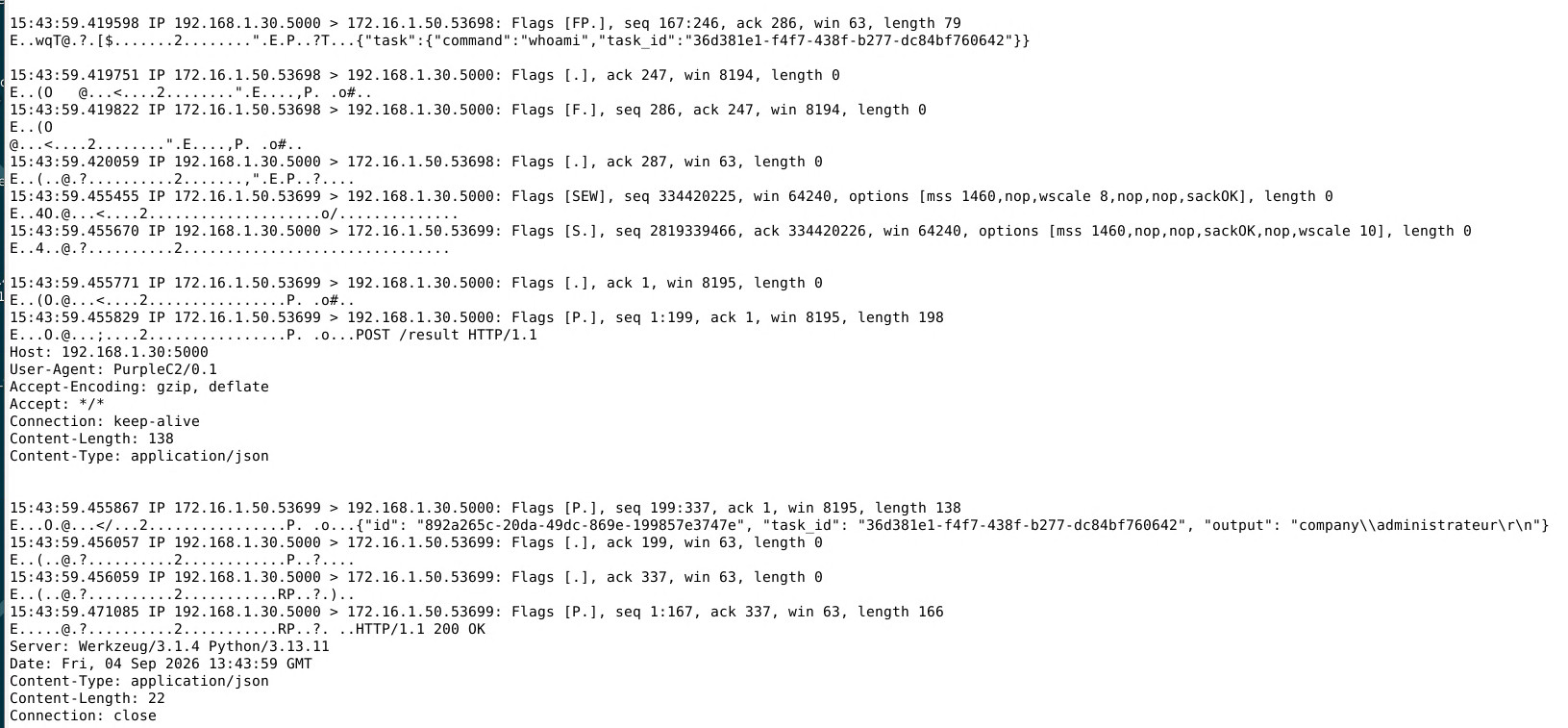
Because the protocol used is unencrypted HTTP, the content of the exchanges is also directly observable on the network.
A capture using tcpdump or Wireshark can, for example, reveal the command sent by the server and the result returned by the agent.
V0 Summary
This first version is intentionally very noisy.
Several indicators make it easy to identify:
- a beacon every ten seconds;
- cleartext HTTP;
- port
5000; - highly descriptive routes;
- the
PurpleC2/0.1User-Agent; - a visible Python console;
- child process creation that can easily be correlated with the agent.
V0 therefore provides a useful baseline for measuring the impact of the changes introduced in later versions.
PurpleC2 V1 — A Less Trivial Network Profile
V1 keeps the same overall architecture, but several elements are modified in order to behave more like a typical Web service. The selected scenario is a browser update service. The objective is not to make the traffic invisible, but to remove several obvious indicators present in V0.
Beacon Jitter
In V0, the agent contacted the server exactly every ten seconds. This fixed interval is replaced by a random delay between 30 and 60 seconds:
MIN_SLEEP = 30
MAX_SLEEP = 60

time.sleep(random.uniform(MIN_SLEEP, MAX_SLEEP))
The interval between two communications therefore varies slightly each time. This mechanism is known as jitter. It removes the perfectly fixed periodicity observed in V0, but it does not eliminate the recurring nature of the communications. A longer delay can also increase the time between task creation and execution. There is therefore a trade-off between communication frequency and agent responsiveness.
HTTP Profile Evolution
The highly descriptive V0 routes are replaced with paths that are more consistent with the selected scenario.
| Function | V0 | V1 |
|---|---|---|
| Agent registration | POST /register |
POST /api/v1/session |
| Task retrieval | POST /beacon |
GET /api/v1/status |
| Result transmission | POST /result |
POST /api/v1/telemetry |
| Task creation from the operator side | POST /send_task |
POST /api/v1/update |
The PurpleC2-specific User-Agent is also replaced with browser User-Agents.
For example:
Mozilla/5.0 (Windows NT 10.0; Win64; x64) AppleWebKit/537.36 (KHTML, like Gecko) Chrome/145.0.0.0 Safari/537.36
or:
Mozilla/5.0 (Windows NT 10.0; Win64; x64) AppleWebKit/537.36 (KHTML, like Gecko) Chrome/146.0.0.0 Safari/537.36
These changes reduce some of the most obvious static indicators found in V0.
Using a Domain Name
In V0, the agent directly contacts the IP address of the C2 server.
In V1, the destination becomes:
update.browser-services.com
Inside the laboratory, this domain resolves to the PurpleC2 server.
This evolution makes the architecture closer to a conventional Web service and also avoids embedding the server IP address directly in the agent configuration.
Application Data Encoding
Data exchanged between the agent and the server is now encoded using URL-safe Base64.
For example:
whoami
can be represented as:
d2hvYW1p
It is important to distinguish between encoding and encryption.
Base64 does not provide confidentiality. It only changes the representation of the data.
In this HTTP-based version, a defender capable of observing the traffic can therefore still recover and decode the transmitted information.
Agent-Side Evolution
The visible Python console is an important artifact in V0.
In V1, the agent is renamed:
updater.pyw
and can be executed using:
pythonw.exe
Running the agent without a console removes the most obvious visual artifact for the user.
However, this does not make the process invisible to monitoring tools.
Detecting V1
Endpoint Detection
Running the agent without a console removes one of V0's visible indicators, but the process remains observable.
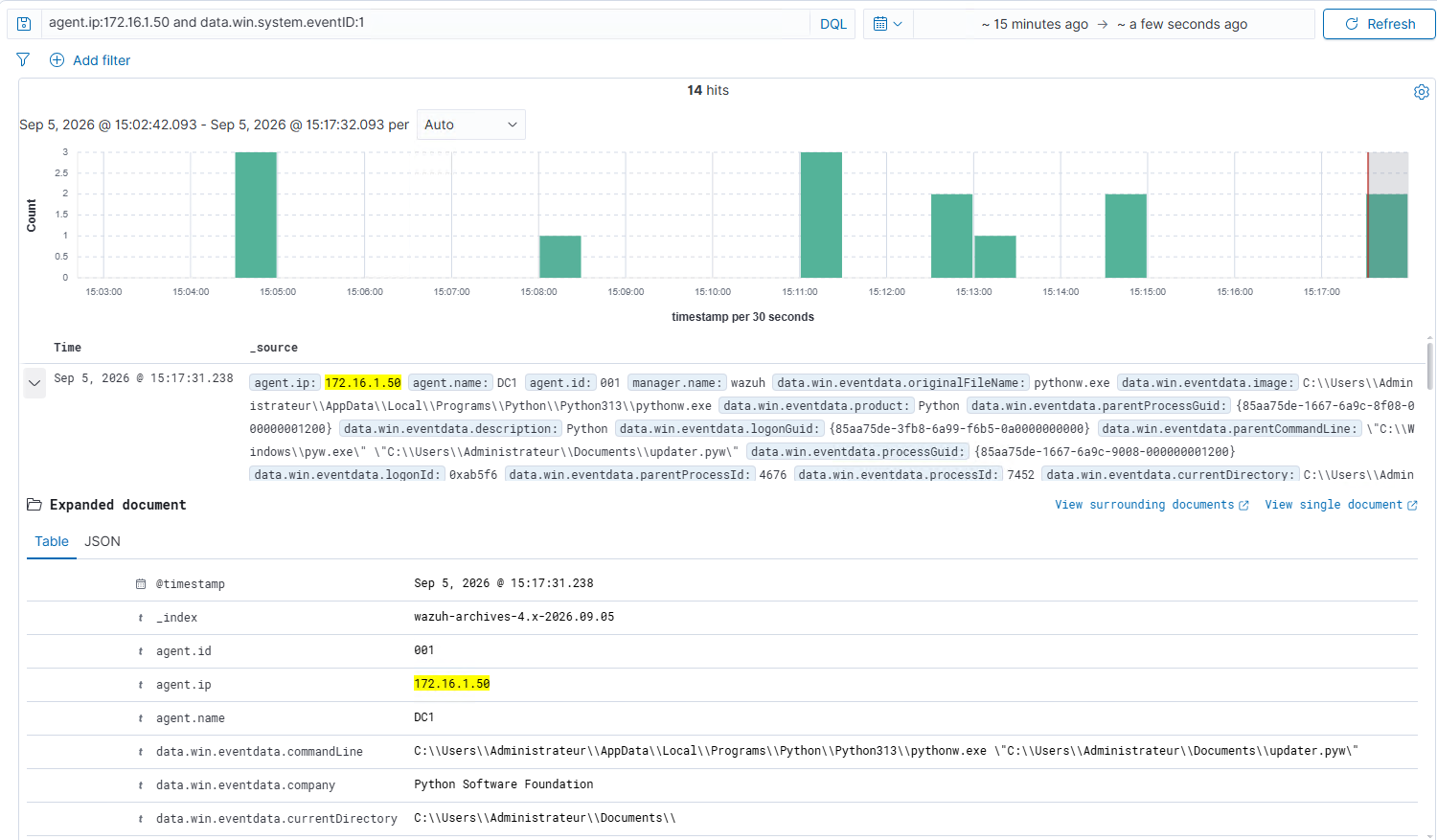
Sysmon events collected by Wazuh show:
pythonw.exe
executing:
updater.pyw
on DC1.
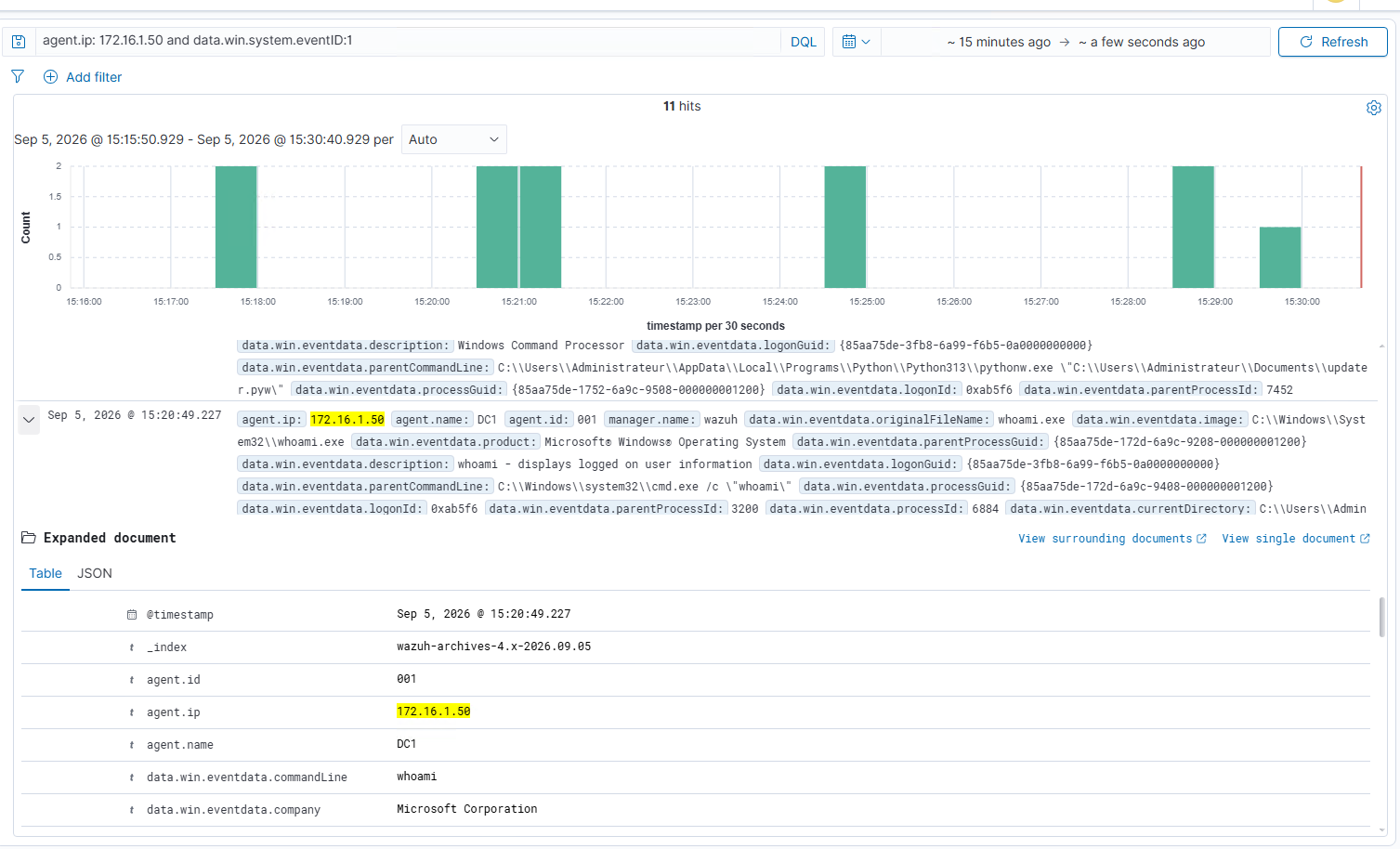
When whoami is executed, the creation of cmd.exe is also still visible.
The parent/child relationship can therefore still be used to associate the executed command with the agent.
Network Detection with Zeek
Because the traffic is still HTTP, Zeek retains significant visibility into the communications.
The logs expose:
- the
update.browser-services.comdomain; /api/v1/session;/api/v1/status;/api/v1/telemetry;- HTTP methods;
- User-Agents;
- transmitted parameters.
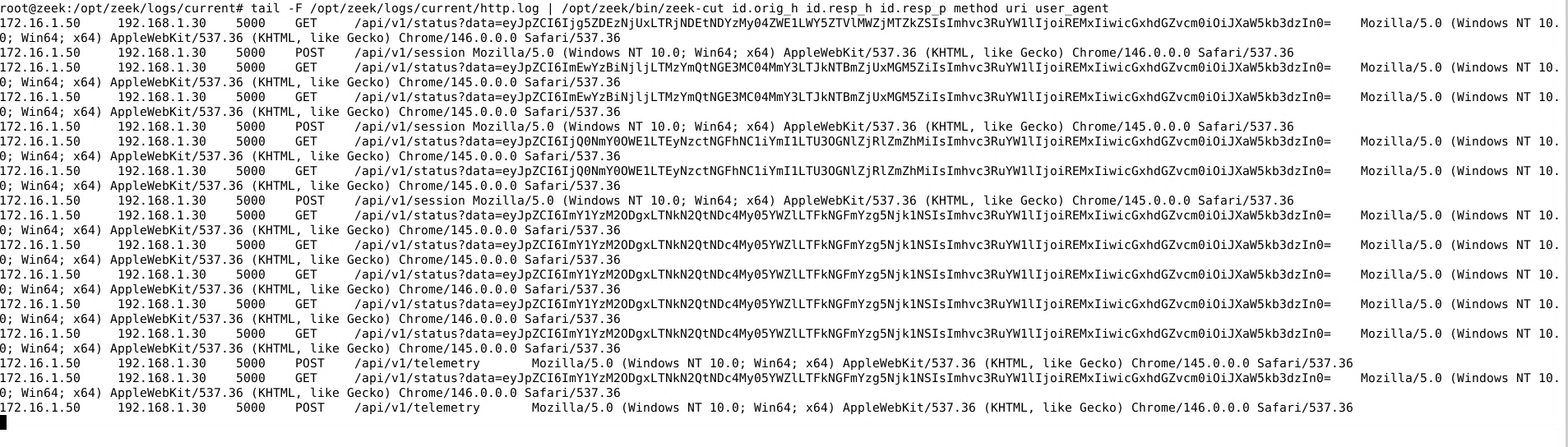
Base64 encoding makes some information less immediately readable, but it does not make it confidential.
PurpleC2 traffic also remains identifiable among other communications because of the destination server and the repeated status requests.
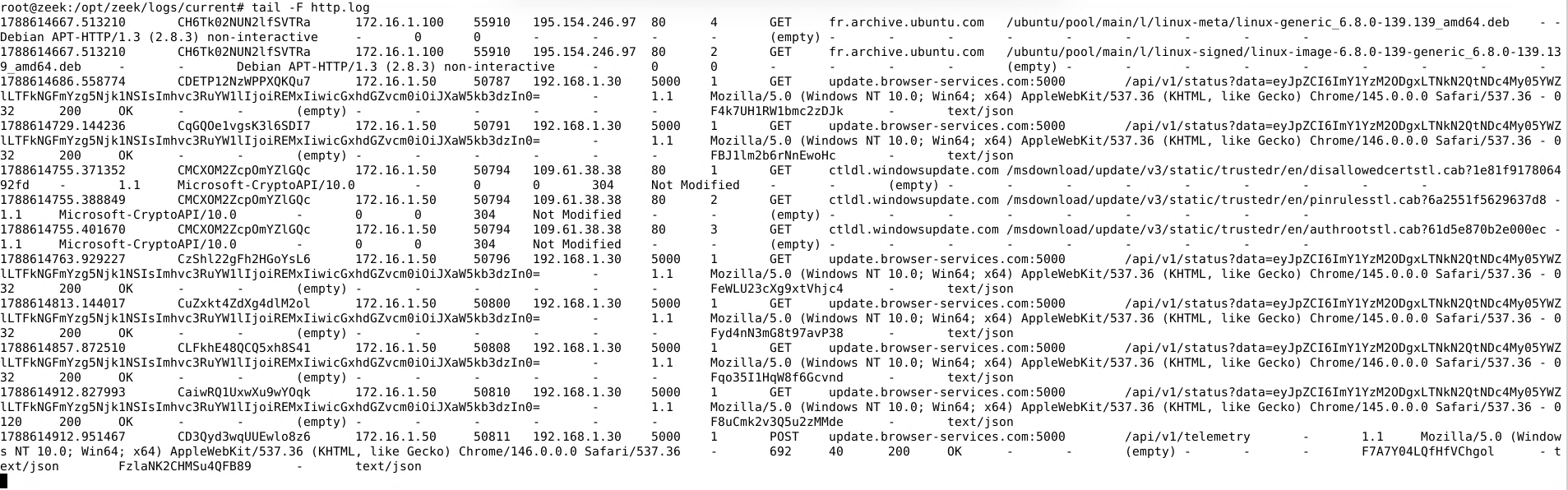
Jitter significantly changes the timing pattern seen in V0.
Communications are no longer separated by exactly ten seconds.

The behavior nevertheless remains recurrent.
Jitter therefore makes a detection rule based only on perfectly fixed periodicity less effective, but does not prevent behavioral analysis over a longer period of time.
V1 Summary
V1 removes several particularly obvious indicators from the initial version:
- the fixed ten-second beacon disappears;
- a domain name is introduced;
- routes are changed;
- the User-Agent looks more like a browser;
- transmitted data is encoded;
- the Python console is no longer visible.
These changes mainly modify the form of the artifacts.
The communications still use HTTP and therefore remain observable by Zeek.
On the endpoint side, Sysmon and Wazuh can still identify the Python process as well as the child processes created when tasks are executed.
Detection therefore becomes less dependent on a single static indicator and starts relying more heavily on the correlation of multiple events.
PurpleC2 V2 — HTTPS, Persistence, and Communication Profiles
V2 introduces three main changes:
- communications are moved to HTTPS;
- a persistence mechanism is added to the laboratory scenario;
- some communication parameters are externalized into configurable profiles.
The main objective is to study how these changes affect defender visibility.
Introducing HTTPS
In V1, communications between the agent and PurpleC2 use HTTP.
A network sensor can therefore directly observe:
- routes;
- User-Agents;
- parameters;
- Base64-encoded data;
- commands;
- results.
In V2, communications are moved to HTTPS.
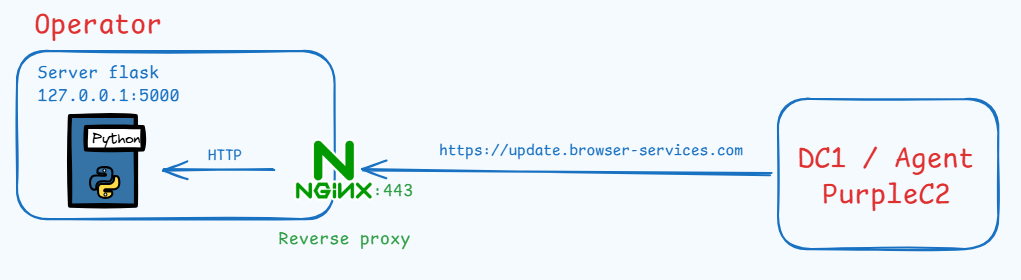
The agent now contacts:
https://update.browser-services.com
on port:
443
An Nginx reverse proxy receives the TLS connection and locally forwards the requests to the PurpleC2 application.
Inside the laboratory, a private Certificate Authority is used to sign the TLS certificate for:
update.browser-services.com
The root certificate of this CA must therefore be added to the trusted certificate store on DC1 so that Windows and Python can properly validate the certificate presented by the server.
In an environment using a certificate signed by a public Certificate Authority already trusted by the operating system, this manual installation would normally not be required.
The main difference concerns network visibility.
With HTTP, Zeek could directly observe information such as:
/api/v1/session
/api/v1/status
/api/v1/telemetry
User-Agent
Base64 payload
command results
With HTTPS, this information is transported inside the TLS session.
A passive network sensor can therefore no longer directly read the HTTP content without an additional decryption mechanism.
Persistence with a Scheduled Task
V2 also introduces a persistence mechanism based on Windows Scheduled Tasks.
From the PurpleC2 interface, the operator can request that the agent create or delete a scheduled task.
In the experiment presented here, the task uses an At Logon trigger.
The principle is simple: when a Windows session is opened, the task can relaunch the agent.
The main purpose of this feature in PurpleC2 is experimental. It makes it possible to observe the traces generated by the creation of a Windows persistence mechanism and verify whether they are correctly collected by Sysmon, Windows event logs, and Wazuh.
Configurable Communication Profiles
In previous versions, several network parameters were directly defined inside the agent code.
For example:
- server address;
- HTTP endpoints;
- User-Agents;
- delay between beacons.
In V2, part of this configuration is externalized into files called profiles.
The goal is to separate network behavior from the main implementation of the agent.
A profile may contain information such as:
communication server
HTTP endpoints
User-Agent
beacon timing
The PurpleC2 interface allows the communication profile to be selected.
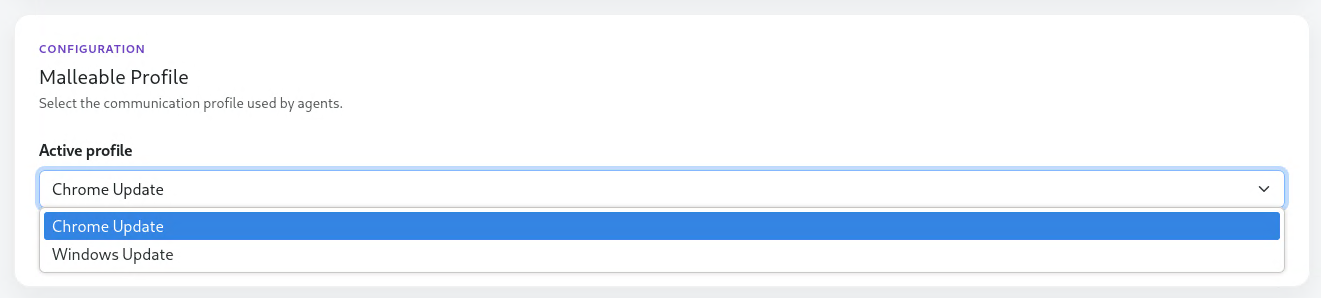
Two profiles are available in the interface, for example:
Chrome Update
Windows Update
During its initial registration, the agent retrieves:
- its identifier;
- its configuration;
- the corresponding profile version.
A versioning mechanism is used to avoid retransmitting the entire configuration during every beacon.
The agent simply tells the server which profile version it currently has.
If the configuration has not changed, there is no need to send another copy of the profile.
If the profile is modified, however, the server can send the updated configuration during a subsequent communication.
This allows some behavior parameters to be modified without directly changing the Python agent code.
Profiles do not automatically make the traffic undetectable. Their main purpose is to modify certain artifacts and study how those variations affect detection mechanisms.
Detecting V2
Network Detection with Zeek
Moving to HTTPS significantly changes network visibility.
Zeek's ssl.log shows connections from DC1:
172.16.1.50
to the server:
192.168.1.30:443
The server_name field exposes:
update.browser-services.com
The observed connections use TLS 1.3 with the following cipher suite:
TLS_AES_256_GCM_SHA384
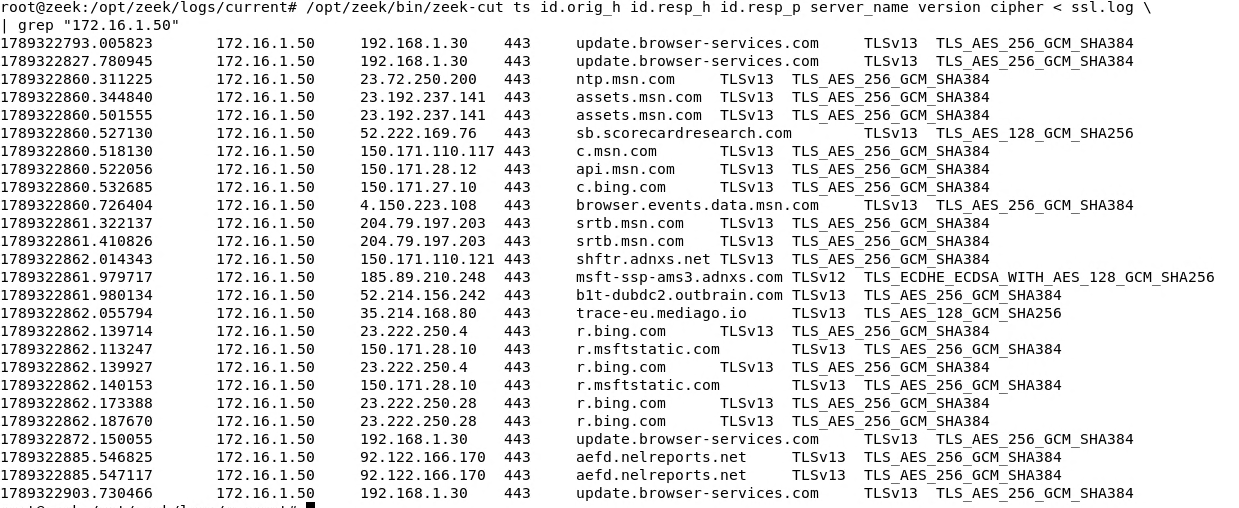
Unlike V1, the following information is no longer directly readable by a passive network sensor:
- HTTP routes;
- User-Agents;
- Base64 payloads;
- commands;
- results.
However, Zeek still retains several useful metadata fields:
- source IP address;
- destination IP address;
- port;
- TLS server name;
- connection duration;
- traffic volume;
- timestamps.
Encryption therefore reduces visibility into the content, but not into the existence of the communications themselves.
Beaconing Analysis Despite HTTPS
Even when HTTP content is no longer visible, connection timestamps remain available for analysis.
When filtering communications between DC1 and PurpleC2, several successive connections in the analyzed sample appear approximately:
32 to 56 seconds
apart.

This observation is consistent with the beacon interval configured in the profile.
However, this alone is not enough to determine that the traffic is malicious.
Many legitimate applications periodically communicate with remote servers.
Periodicity becomes much more useful when combined with other information obtained from the network or from the endpoint.
Endpoint Detection with Sysmon and Wazuh
TLS encryption protects the content being transported over the network, but it does not hide the local activity of the process initiating the communication.
Sysmon Event ID 3 — Network Connection events make it possible to associate connections to:
192.168.1.30:443
with the Python process running on DC1.
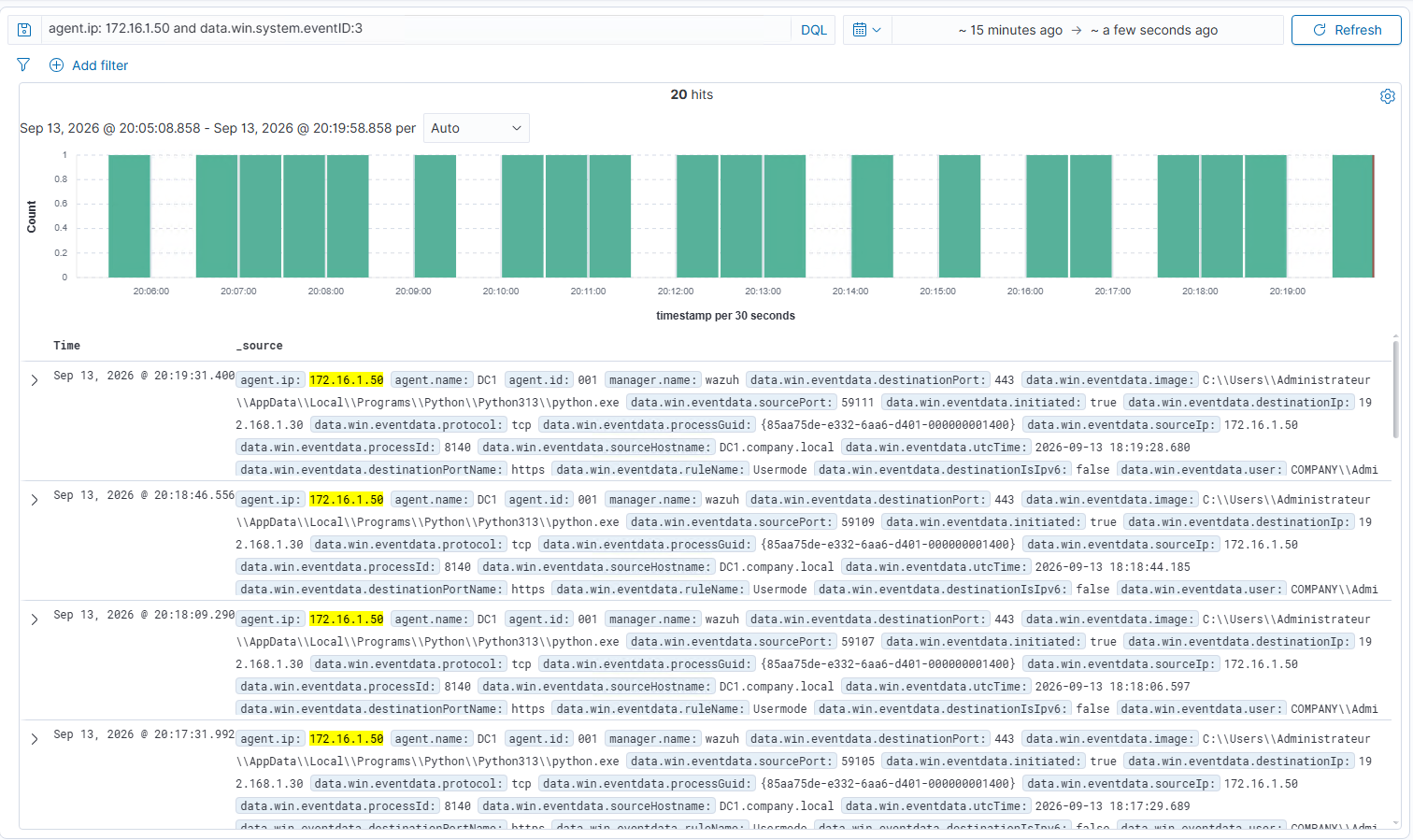
In this specific capture, the agent is intentionally executed using:
python.exe
in order to simplify experimentation and event observation during testing.
In the V1 scenario shown earlier, the agent can instead be executed with:
pythonw.exe
to avoid displaying a console window.
This difference is therefore not intended to represent a functional regression between the two versions.
Traces Left by the Scheduled Task
The persistence mechanism also generates several useful traces.
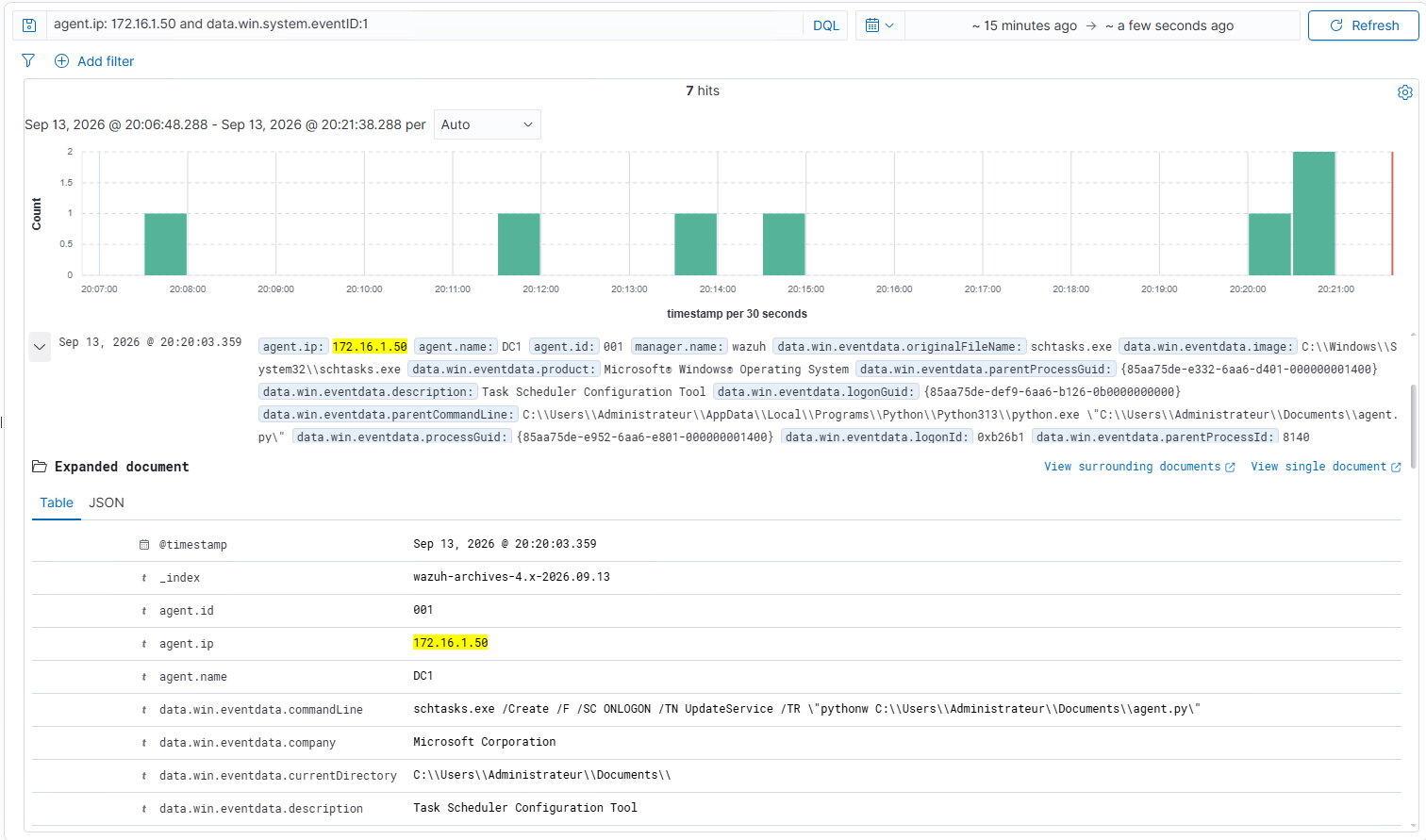
A Sysmon Event ID 1 — Process Create event shows the execution of:
schtasks.exe
from the Python process running the agent.
The command line indicates the creation of a task named:
UpdateService
Windows Security logs provide an additional source of visibility.
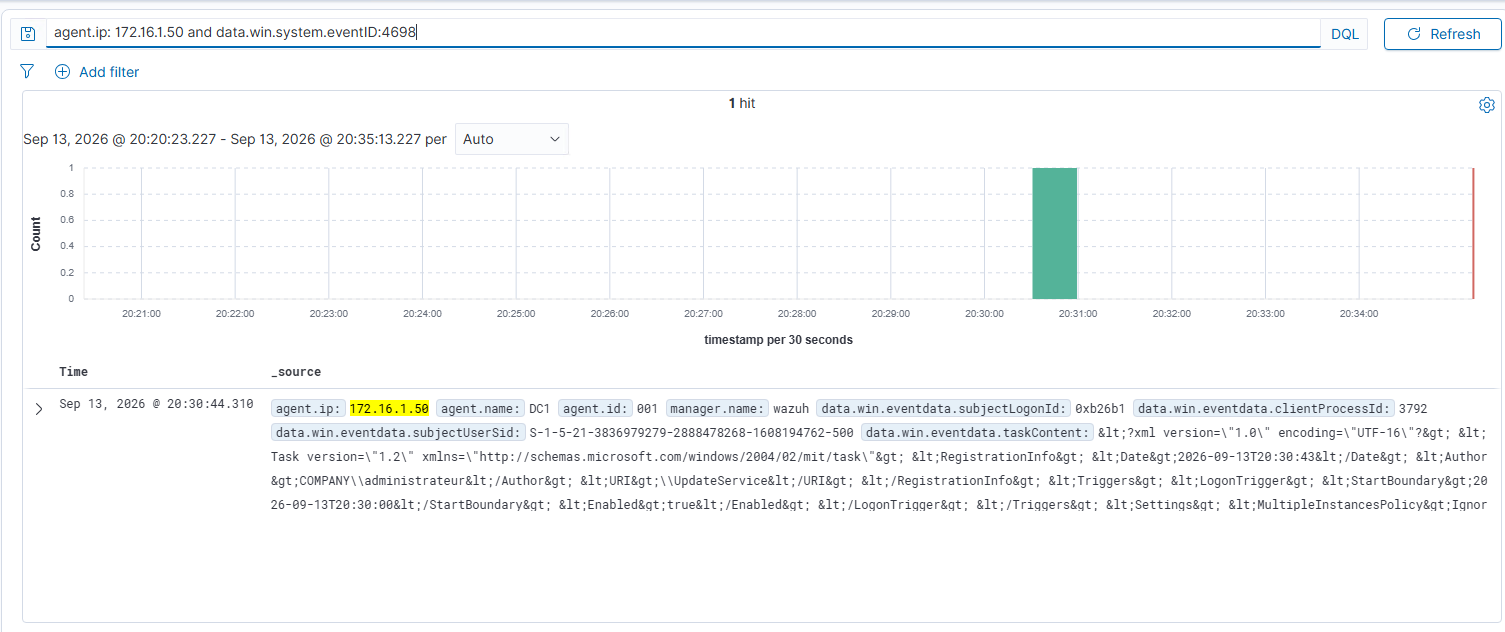
Windows Security Event ID 4698 indicates that a new scheduled task has been created.
In the capture, the XML content of the task includes a:
LogonTrigger
It is important to distinguish between two different facts here.
Event ID 4698 confirms that the scheduled task was created.
By itself, however, it does not prove that the task was later executed during a logon event.
This distinction matters during incident analysis: evidence that a persistence mechanism was configured is not necessarily evidence that it was successfully executed.
Commands Remain Visible on the Endpoint
HTTPS encrypts network transport, but it obviously does not prevent Windows from observing locally created processes.
When executing:
ipconfig
Wazuh observes:
cmd.exe /c "ipconfig"
Parent process information also makes it possible to associate this cmd.exe process with the Python process running the agent.
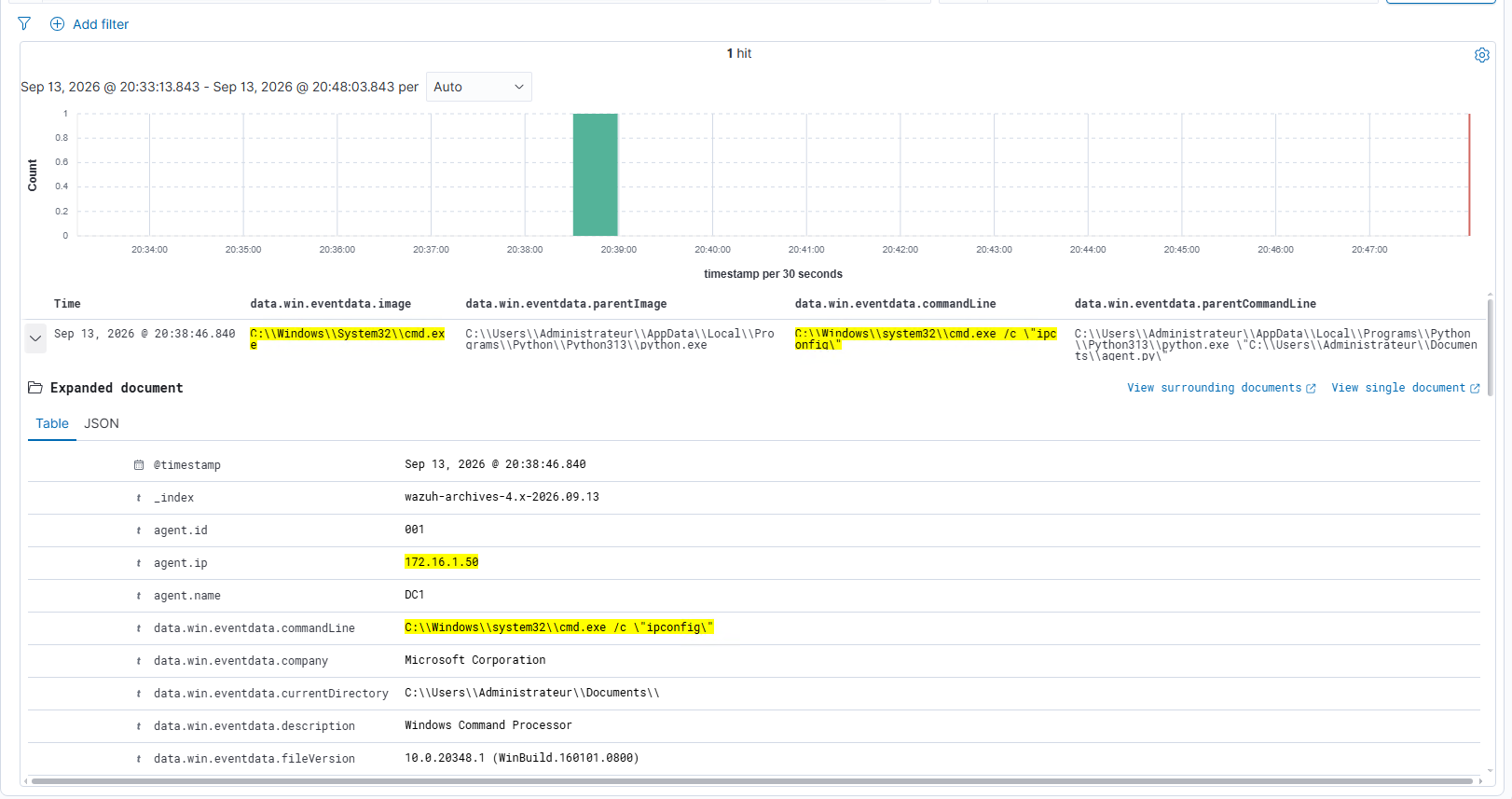
The command is therefore no longer readable through passive network monitoring, but remains observable on the system that executes it.
This difference highlights the importance of combining multiple telemetry sources.
V2 Summary
V2 significantly changes the network visibility of PurpleC2.
Moving to HTTPS removes the following information from passive network visibility:
- HTTP routes;
- User-Agents;
- application data;
- commands;
- results.
However, a significant amount of information remains available.
Zeek still exposes TLS and timing metadata.
Sysmon and Wazuh continue to observe:
- the process initiating the connections;
- process creation events;
- executed commands;
- the use of
schtasks.exe; - scheduled task creation.
Configurable profiles introduce another dimension by allowing some network behavior parameters to change.
Detection therefore becomes progressively less dependent on a single static indicator and more dependent on the correlation of multiple events.
Possible Future Evolutions
PurpleC2 intentionally remains much simpler than mature Command and Control frameworks. However, its current architecture could serve as a foundation for several further evolutions.
Existing frameworks illustrate some of these possible directions. Cobalt Strike, for example, relies heavily on Malleable C2 profiles to separate communication behavior from the core agent logic, while Mythic uses a modular architecture in which C2 profiles and payload types are implemented as independent components. Sliver also demonstrates how a single C2 platform can support several communication transports, including HTTP(S), mTLS, DNS, and WireGuard.
A future version of PurpleC2 could therefore extend the profile system into a more complete transport abstraction, allowing different communication mechanisms to be selected without redesigning the agent. The platform could also introduce stronger per-agent authentication, signed task messages, replay protection, multi-operator support, and a more modular task architecture.
Another natural evolution would be to focus on the defensive side of the project. Instead of manually comparing Zeek, Sysmon, and Wazuh events, PurpleC2 could be used as a controlled adversary-emulation platform to automatically generate known behaviors and validate detection rules against them.
Limitations of the Experiment
The results presented in this article come from a controlled laboratory environment.
PurpleC2 is intentionally minimal and does not attempt to reproduce the full complexity of a real-world C2 framework. The number of systems, the volume of network traffic, and the profiles used during the experiments are also limited. The observations presented here should therefore be considered an experimental study of detection mechanisms rather than an exhaustive evaluation of C2 infrastructure detection. The primary goal of the project is to understand how different evolutions of the communication channel affect the visibility available to defenders.
Conclusion
Across the different versions, PurpleC2 does not become invisible: instead, the observable artifacts change.
V0 can be detected using several obvious indicators, while later versions require more correlation between network and endpoint telemetry. The use of HTTPS illustrates this particularly well. It protects application-layer content on the network, but does not hide either the timing of the connections or the activity of processes running on the endpoint.
The overall progression can be summarized as follows:
| Version | Transport | Beacon | Network Visibility | Endpoint Visibility |
|---|---|---|---|---|
| V0 | HTTP | Fixed, 10 s | Very high: routes, User-Agent, commands, and results visible | Very high |
| V1 | HTTP | Jitter, 30–60 s | High: HTTP content still visible | High |
| V2 | HTTPS | Configurable | Encrypted application content, but metadata remains visible | High |
The main lesson from this experiment is that improving a C2 communication channel does not necessarily remove its traces: it often shifts where those traces can be observed.
An obvious network indicator present in one version may disappear in the next, while another indicator remains visible at the endpoint level. This is precisely where a Purple Team approach becomes valuable.
Rather than relying on a single signature, a defender can correlate several sources of telemetry:
recurring network connection
        +
process initiating the connection
        +
child process creation
        +
persistence mechanism
Detection therefore becomes increasingly behavioral rather than purely signature-based.
MITRE ATT&CK Mapping
The following table only includes MITRE ATT&CK techniques that are actually represented by PurpleC2 during the experiments.
| Technique | V0 | V1 | V2 |
|---|---|---|---|
| T1071.001 — Web Protocols | ✅ | ✅ | ✅ |
| T1059.006 — Python | ✅ | ✅ | ✅ |
| T1059.003 — Windows Command Shell | ✅ | ✅ | ✅ |
| T1033 — System Owner/User Discovery | ✅ | ✅ | ✅ |
| T1082 — System Information Discovery | ✅ | ✅ | ✅ |
| T1132.001 — Standard Encoding | ❌ | ✅ | ✅ |
| T1001.003 — Protocol or Service Impersonation | ❌ | ✅ | ✅ |
| T1564.003 — Hidden Window | ❌ | ✅ | ✅ |
| T1053.005 — Scheduled Task | ❌ | ❌ | ✅ |
The evolution between V0, V1, and V2 does not necessarily result in a large number of new MITRE ATT&CK techniques. This is expected: ATT&CK describes adversary behaviors rather than the sophistication level of an implementation.
For example, moving from HTTP to HTTPS significantly changes what a passive network sensor can observe, but both transports still fall under T1071.001 — Web Protocols. Similarly, jitter and configurable communication profiles modify the network behavior of PurpleC2 without necessarily introducing separate ATT&CK techniques. The mapping therefore remains relatively stable even though the detection challenge evolves significantly between versions.